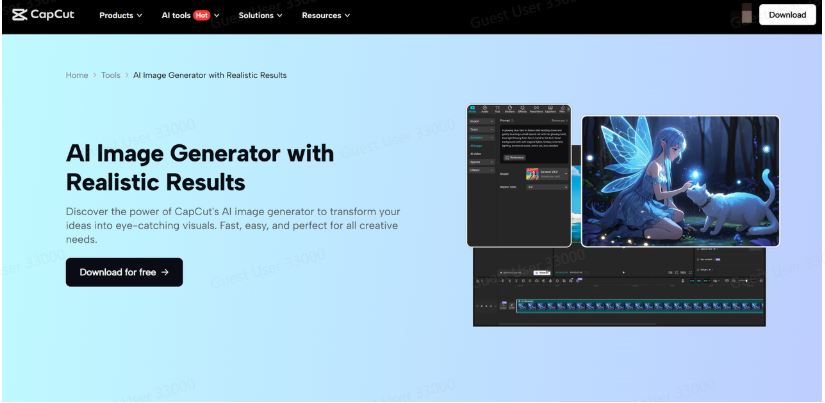
Gaming has always been about more than just playing—it’s about the community, the creativity, and the way players express themselves beyond the screen. From sharing epic wins to designing fan art, gamers love to showcase their style. With CapCut AI Image Generator, you don’t need to be a Photoshop expert to create stunning, fun gaming photos that grab attention. This AI-powered tool helps you turn your ideas into visuals instantly, whether you’re making character edits, fantasy battle scenes, or gaming-inspired profile pictures.
Why Use CapCut Image Generator for Gaming Photos?
Gamers thrive on visuals. Whether you’re streaming, running a gaming fan page, or just sharing highlights with friends, unique images make your posts stand out. Traditional photo editing can take hours, but CapCut’s AI Image Generator changes the game by creating photos with just a few prompts.
Here’s why it works so well for gamers:
- Bring Characters to Life – Imagine your favorite in-game character redesigned in a futuristic city or reimagined in anime style. The Image Generator can do that.
- Perfect for Thumbnails – Eye-catching thumbnails are crucial for streamers and YouTubers. You can generate bold, colorful gaming-inspired photos in minutes.
- Custom Avatars & Profile Pics – Want to stand out in Discord, Twitch, or Steam? Create fun avatars that reflect your personality or your favorite gaming genre.
- Quick Creativity Boost – No need to stress over design tools. Just type your idea, and CapCut transforms it into a high-quality photo.
Whether you want realistic gaming edits or imaginative, surreal photos, this tool makes the process both simple and fun.
How to Create Fun Gaming Photos in CapCut Image Generator
Here’s a quick and easy guide to help you start making gaming-inspired photos with CapCut:
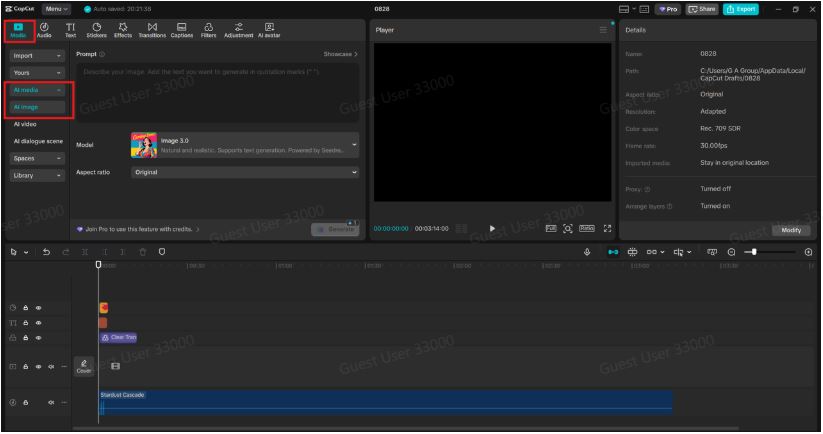
Step 1: Open CapCut and Access the AI Image Generator
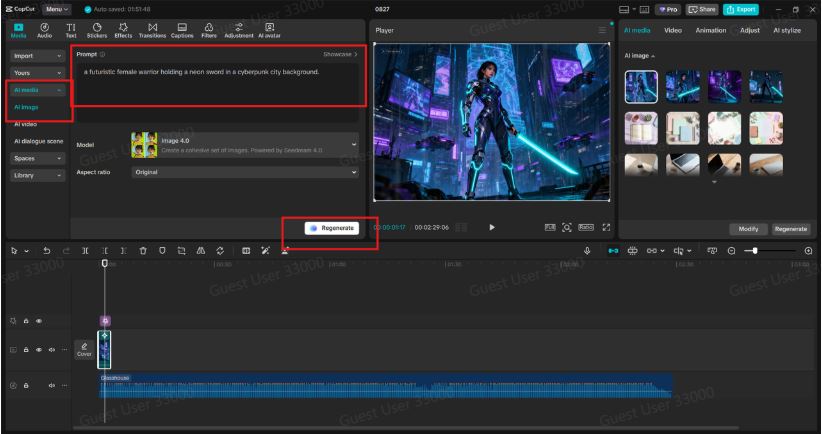
First, download and install CapCut Desktop Video Editor if you haven’t already. Once you open it, head to the AI Image feature. You’ll be greeted with a clean workspace where you can start typing your prompts. Think about what kind of gaming photo you want—maybe a glowing cyberpunk warrior, a fantasy RPG character, or a group of heroes in a pixel-art world. Be as descriptive as possible in your prompt. Instead of writing “a gaming character,” write “a futuristic female warrior holding a neon sword in a cyberpunk city background.” The more details you add, the better your result will match your vision.
Step 2: Customize Your Gaming Style
Once your image is generated, you can refine it to match your gaming vibe. CapCut offers different styles so that you can choose between:
- Anime or AI Avatar – Great for fun avatars and fan edits.
- Realistic Style – Perfect for dramatic battle scenes or realistic portraits.
- Fantasy Art Style – Ideal for RPG or adventure-inspired photos.
- Pixel or Retro Style – A must-try for retro gaming fans.
After selecting the style, you can adjust details such as background, colors, and effects. If you want your character to glow, add “neon lighting” to your prompt. If you want a battle-ready look, describe armor or weapons. This is where the magic happens—experiment with styles until you find one that feels right.
Step 3: Save and Share Your Gaming Photo
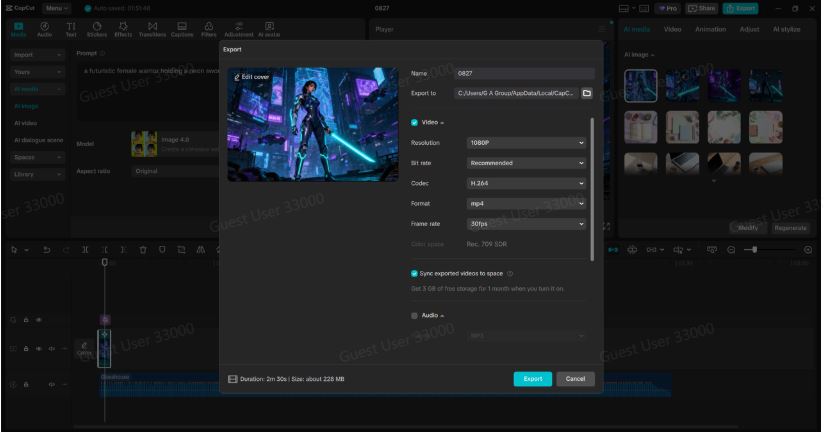
Once you’re happy with your creation, hit Export to save your gaming photo. From here, you can:
- Upload it as a profile picture on Twitch, Discord, or Steam.
- Use it as a YouTube thumbnail for your gaming videos.
- Post it on Instagram, TikTok, or Twitter to show off your creativity.
- Print it or keep it as part of your personal gaming art collection.
And if you’re working on multiple images, you can even turn them into a mini gaming photo album or slideshow with CapCut’s built-in video editor.
Creative Ideas for Fun Gaming Photos
If you’re not sure where to start, here are some fun ideas to try with CapCut’s Image Generator:
- Epic Boss Fight Scene – Generate a fantasy monster and place your character in an action shot.
- Crossover Characters – What if a Minecraft character appeared in a Cyberpunk 2077 world? Let AI imagine it.
- Animated Avatars – Create multiple versions of your gaming persona in different outfits or moods.
- Streamer Branding – Build custom backgrounds and character art that match your channel’s theme.
- Squad Posters – Make fun team photos of your gaming group in unique styles (anime squad, superhero squad, etc.).
The possibilities are endless, and the more creative your prompts, the cooler your photos will turn out.
Conclusion
Gaming is all about imagination, and with CapCut Image Generator, you can take that creativity to the next level. Whether you’re designing avatars, crafting fan art, or building thumbnails for your channel, this tool makes it quick, fun, and beginner-friendly. So next time you want to show off your gaming spirit, skip the complicated editing tools and let CapCut’s AI Image Generator bring your ideas to life. Who knows? Your fun gaming photo might just become the next viral trend in your community.
 Home
Home